Terraform Structure: infrastructure As Code Scalability
Terrafrom is a powerful tool that helps your company automate, scale and manage your IT infrastructure through a few lines of code. Keeping code readable and organised for future team members, or even yourself, after a few weeks can become tricky if the proper planning is not followed in the beginning. A poorly structured Terraform configuration can lead to deployment failures, inconsistencies, and maintenance nightmares down the line.
In this blog, I share some of the useful file structuring used when beginning my Terraform journey and the advanced techniques I learned along the way. The first goal would be to get your script functioning, the next is to make it scalable. This blog will help you balance out the transition from a working Terraform script to a scalable one.
Breaking Down Monolithic Infrastructure
When beginning a new Terraform project, it is common to start defining resources in a single file. However, when complexities are introduced, this single file structure becomes unmanageable and harder to scale. Terraform provides an in-depth guide for more assistance.
- Readability: A single, large file can be overwhelming and difficult to navigate, especially for new team members or when revisiting code after a long period.
- Maintainability: As your infrastructure grows, making changes to a single file becomes increasingly risky. A small change can have unintended consequences in other parts of the code.
- Reusability: It's difficult to reuse code from a monolithic structure in other projects or modules.
- Testability: Testing a monolithic structure can be challenging and time-consuming.
Before diving into more advanced configurations like modularisation, one of the first beneficial things to do is to organise your Terraform code by resource type. This approach enhances readability and maintainability while promoting a more granular understanding of your infrastructure.
Separating resources from different groups that have a relation and then into separate files makes it easier to find, locate and understand specific components of your infrastructure for improved readability.
Making changes to a particular resource type or unintended changes to a file can be isolated, reducing the risk of side effects. Giving you an easier debugging process and enhancing your maintainability in isolation.
Speaking of isolation, the best upside of splitting your code up is that you can collaborate with your team members on different resources at your own pace without interfering with each other's work.
Example File Structure
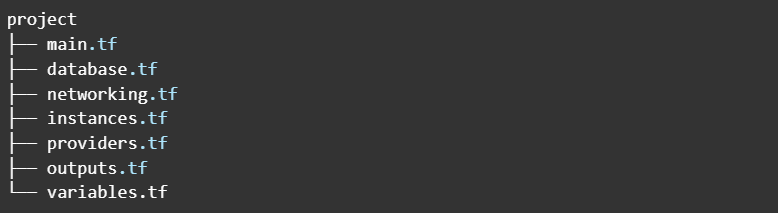
Here's a common file structure that organises resource by type:
Explanation:
The most common files used in terrafrom configuration are main.tf, providers.tf, outputs.tf and variables.tf. However, splitting your resource configuration makes it easier to manage. All the resources configured in the root directory can communicate and be referenced as if they were in the same file.
- networks.tf: Contains definitions for VPCs, subnets, route tables, internet gateways, and other networking resources.
- main.tf: Defines the core infrastructure resources.
- variable.tf: Declares input variables that can be customised when using the module.
- outputs.tf: Defines output values that can be used by the calling module or exported as outputs of the entire configuration.
Additional Considerations:
- Module Structure: Organising by resource type is a good starting point. Consider using modules to encapsulate related resources into a single resource block and corresponding directory. For example, a module for a web application might include instances, load balancers, and security groups.
- State File Size: As your infrastructure grows, a large state file can impact performance. Consider splitting your configuration into multiple Terraform workspaces to manage different parts of your infrastructure separately. This won't be covered in this blog
By combining a resource type-based organisation with modularisation, you can create a well-structured Terraform codebase that is easy to understand, maintain, and scale.
Advanced: Terraform Modules: Reusable Building Blocks
Terraform modules are powerful tools for organising and reusing infrastructure components. By encapsulating related resources into modules, you can promote code reusability, improve maintainability, and accelerate development.
In essence, modules function as containers for multiple resources that are used together, essentially creating an abstraction layer that encapsulates complex infrastructure components.
This parameterisation allows you to instantiate the same module with different configurations across various environments. Consider this practical example: a single Amazon RDS module could be used to deploy both production and staging databases, with environment-specific configurations passed through variables.
Module Structure and Definitions
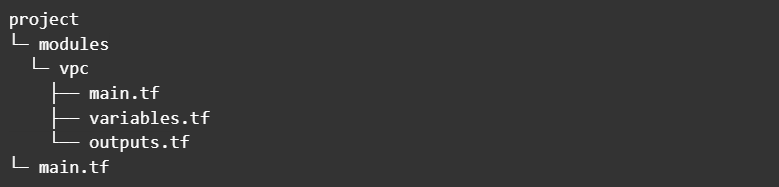
A Terraform module typically consists of the following files:
main.tf: This file defines the core infrastructure resources within the module. It's the heart of the module, containing the Terraform code that provisions and manages the resources.
variables.tf: This file declares the input variables that can be customised when using the module. These variables act as parameters, allowing you to configure the module's behavior.
outputs.tf: This file defines the output values that the module exposes. These outputs can be used by other modules or to access information about the provisioned infrastructure. A module resides in its own directory. Here's a typical structure for a VPC module:
Using Modules
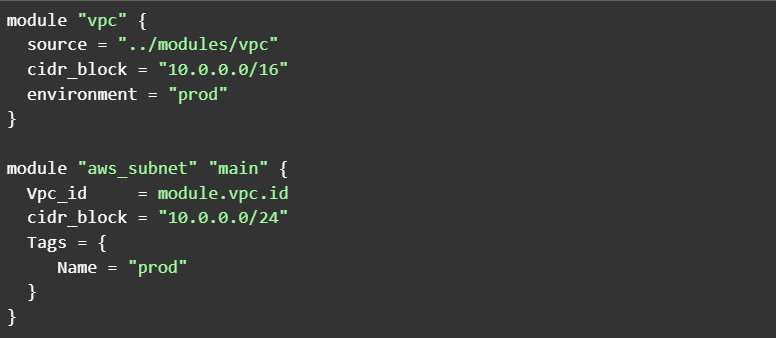
To use a module, you use the `module` block in your Terraform configuration. The `source` argument specifies the location of the module.
Here's an example of how to use the `vpc` module in an AWS environment:
In this example, the module "vpc" block instantiates the VPC module. The cidr_block and environment arguments provide values for the module's input variables. The module "aws_subnet" block then uses the vpc_id output from the vpc module to create a subnet within that VPC. This demonstrates how modules can interact and build upon each other.
Benefits of Using Modules
Modules offer several significant advantages:
- Maintainability: Modules promote blast radius containment. Changes within a module are less likely to have unintended consequences on other parts of your infrastructure. This isolation simplifies debugging and reduces the risk of errors. For example, changes to a VPC module are unlikely to affect application modules (as long as the module's interface—inputs and outputs—remains compatible).
- Scalability: Modules facilitate the creation of complex infrastructure patterns through composition. You can combine smaller modules to create larger, more complex ones. For instance, an application stack module could be composed of separate modules for networking, compute, and storage, each handling its specific concern while working together through well-defined interfaces. This hierarchical approach makes it easier to manage and scale your infrastructure. This is an advanced technique, but even basic module use significantly improves scalability.
- Collaboration: Modules act as technical contracts between teams. Well-defined module interfaces (inputs and outputs) allow different teams to work independently. Platform teams can maintain core modules while application teams consume them, fostering efficient collaboration.
Best Practices
- Define Minimum Requirements: Before creating a module, carefully consider the minimum resources and configurations it should include. Avoid grouping unnecessary resources. A well-defined scope ensures that your modules are focused and reusable.
- Document Thoroughly: Clear documentation is crucial for module usability. Document the module's purpose, input variables, outputs, and any dependencies. Tools like terraform-docs can help automate this process.
- Test rigorously: Implement comprehensive tests to ensure your modules function as expected. Terraform's built-in testing capabilities, along with tools like Terratest, can help you achieve thorough test coverage.
Testing and Documentation Benefits
Documentation and testing in Terraform modules function as complementary practices that ensure both the reliability and usability of your infrastructure code. Think of documentation as a detailed blueprint of your module's capabilities, while testing validates that the blueprint accurately reflects reality. When implementing a new module feature, such as automated subnet creation across availability zones, your documentation explains the architecture and configuration options, while your testing suite verifies that the infrastructure deploys exactly as described. This synchronised approach creates a source of truth where documentation and functionality remain perfectly aligned.
The maintenance and evolution of modules over time highlight the crucial interplay between these practices. As modules grow and adapt to new requirements, tests verify that new features work as documented while ensuring existing functionality remains intact. This integration helps catch potential issues early - if a test reveals that your VPC module behaves unexpectedly with certain CIDR ranges, you can add a test case to prevent regression, update the documentation to clarify limitations, and implement input validation to prevent similar issues. Through this approach, your modules remain reliable, well-documented, and maintainable as they evolve.
The Terraform community provides a robust foundation of native testing capabilities that integrate seamlessly into module development. At its core, Terraform's built-in testing functionality centers around variable validation blocks, which helps test individual components, whole modules or fine-grained problems like syntax or letter length limitations for certain resources.
Follow the Terraform Test Documentation and run the command to perform tests
These validation blocks allow you to implement precise rules for your input variables, ensuring that values meet specific criteria before Terraform attempts to create any infrastructure. For example, you can validate that environment names follow your organisation's conventions, that CIDR ranges fall within acceptable blocks, or that instance types align with your approved list.
This validation layer works in conjunction with tools like terraform-docs, which automatically generate standardised documentation by analysing your Terraform files
Follow terraform-docs for more information.
The terraform-docs tool captures not just the structure of your variables and outputs but also includes these validation rules in the generated documentation, creating a clear connection between your module's requirements and its implementation. Together, these built-in capabilities provide a solid foundation for maintaining reliable and well-documented infrastructure modules, while more advanced testing frameworks like Terratest can build upon this foundation for continuous and comprehensive testing coverage.
In conclusion, when starting a new terraform project, it is advised to use these steps to make your development experience smooth and easy. The cloud is known for its rapid scaling, so being able to provision and handle this scaling starts with good file structure and with effective modularisation practices. Teams can build scalable, maintainable, and secure infrastructure while enforcing standardisation across their organisation. For beginners, the most important practice is splitting your infrastructure into “bite-sized” structures.