

Bring the AWS Console directly into your IDE. The AWS Toolkit for Visual Studio 2022 simplifies development, deployment, and debugging — without breaking your workflow.
As a developer, you are constantly seeking ways to streamline your work and make it easier. And when it comes to cloud computing, Amazon Web Services (AWS) is one of the most popular platforms. But what if I told you that you can access the AWS Console and services from the convenience of Visual Studio 2022?
The AWS Toolkit extension is here to make your work easier, faster and more efficient. It simplifies your workflow and helps you develop, deploy, and debug applications in the AWS cloud. In this article, we will discuss the benefits of the AWS Toolkit extension and how to install it.
Why Use AWS Toolkit for Visual Studio 2022?
The AWS Toolkit for Visual Studio 2022 provides a seamless experience for developing AWS applications within Visual Studio. With this extension, you can perform various tasks, such as creating and deploying AWS CloudFormation templates, debugging AWS Lambda functions, launching and configuring EC2 instances, and a whole lot more — all without leaving your favourite IDE.
This extension integrates with AWS services, such as AWS Identity and Access Management (IAM), Amazon S3, Amazon DynamoDB, and more. For .NET developers, the AWS Toolkit provides dedicated support, making it an ideal choice for cloud-native .NET application development.
How to Install AWS Toolkit for Visual Studio 2022
Installing the AWS Toolkit for Visual Studio 2022 is straightforward:
- Open Visual Studio 2022 and go to the Extensions menu.
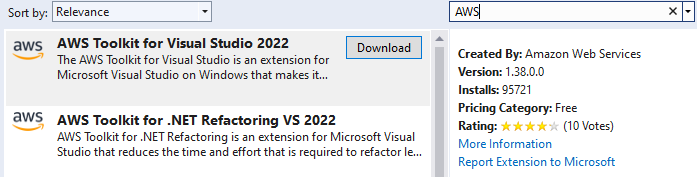
- Select Manage Extensions and search for AWS Toolkit for Visual Studio 2022.
- Click the Download button and install the extension.
- Restart Visual Studio 2022 after installation completes.
- Follow the on-screen instructions to finish setup.
How to Try Out AWS Toolkit for Visual Studio 2022
To try out the AWS Toolkit, you need an AWS account. Once you have one:
- Open Visual Studio 2022 and create a new project.
- After installation you'll be prompted to enter your AWS Access Key and Secret Access Key — enter them and select Save and Close.
- You'll have access to your AWS console where you can view and administer resources.
- In your project templates you'll see new templates for common AWS use cases.
The AWS Toolkit for Visual Studio 2022 is an excellent tool for developers who work with AWS. With seamless integration across services, you can manage your AWS resources with ease and stay in the flow of development.
Contact CloudZA® to discuss how we can assist you with your AWS infrastructure, developer tooling, and cloud architecture.
Ready to start your cloud journey?
Talk to a CloudZA® specialist — no commitment required.